
Fintech Software Design
The Product:
An end-to-end platform that streamlines valuations, diligence, escrow payments, and buyer-seller matchmaking for private equity and corporate development deals.

The Problem:
The diligence process for corporate development and mergers and acquisitions (M&A) teams is often very slow and cumbersome because data is scattered throughout multiple tools. It can also be difficult for these teams to find businesses that fit their portfolio that are also ready for acquisition.
The Goal:
DealNexa provides a centralized place to replace these disconnected tools to manage deals more efficiently and to improve organization, helping make acquisitions smoother and less time consuming. The product allows users to manage the full lifecycle from sourcing to acquisition.
User Research Summary
Pain Point 1:
Users find it difficult to maintain databases of contacts and acquisition opportunity details across multiple disjointed tools.
Pain Point 2:
There isn’t a tool on the market that brings together all components of the mergers and acquisitions (M&A) process, from sourcing to acquisition. So the only option has been to use multiple tools and to operate inefficiently.
Considering these pain points, the intent was to create a user-friendly product that streamlines all components of a deal, from sourcing to acquisition with functionality such as deal pipeline management, tasks lists, reporting, document review, and more.
Persona: Problem Statement
David is a busy managing partner at a private equity firm who needs a more efficient way to source and close add-on acquisitions so he can drive greater returns for the firm and its investors.

User Journey Map
The goal was to create a more organized process for sourcing, diligence and acquisition of deals, while keeping team members in the loop on deal progress.

Site Map
The site map was organized in a way to help users easily navigate from page to page to manage and organize their deals, documents, and contacts.

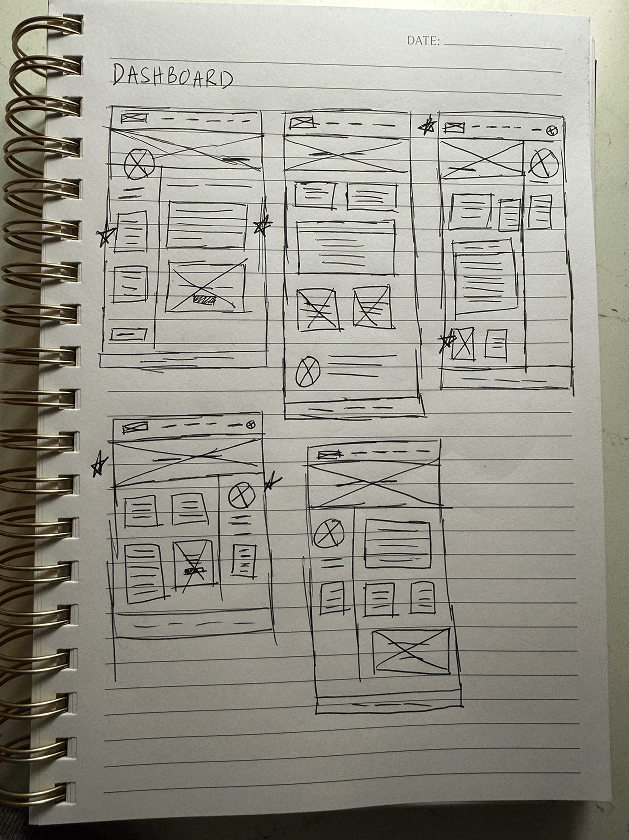
Paper Wireframes
I wireframed multiple versions of each page, as I worked through the design process. Then, I selected the best option for each one. Due to time constraints with development, the team needed me to go from paper wireframes straight to mockups.


Sign Up Page Mockup
The signup screen was created with one form enclosed in a white rectangle, the logo, and a short welcome message, without other distracting information, to encourage more signups.

Dashboard Page Mockup
The Executive Dashboard was designed to house all important information “at a glance” including the revenue and quantity of deals in a user’s pipeline, notifications, upcoming milestones, alerts and risks, deal health indicators, top relationships, and reports.

Deal Pipeline Page Mockup
The Deal Pipeline provides an “at a glance” view of all deals, including the most important details, such as the deal name, revenue for each deal, the company, deal owner, and target close date.

Transaction Workspace Page Mockup
The Transaction Workspace overview page is the first page users see when viewing the details of a deal in their pipeline.

Add New Task Mockup
A flyout was used to allow users to add new tasks. This provided adequate space for all fields that needed to be completed.

Delete Confirmation Mockup
To prevent members in an organization from being accidentally deleted, a confirmation modal was created. This modal contains a clear message asking if the user is sure and explaining that this action cannot be undone, with a text box requiring them to type in the word ‘DELETE’ if they are sure. The button to move forward with deletion is red, ensuring it stands out and the user is clear on the action they’re taking.

Low-fidelity Prototype
The user flow was meant to easily guide users through the steps of logging their points and earning more points. This was the focus because after receiving feedback on the old platform, the prompt for submitting claims on the dashboard was easily overlooked. The old platform also didn’t make it clear that actions outside of logging claims (i.e. taking advantage promotions and doing courses under “my learning”) could help users earn more points.

Desktop Screen Mockups

Mobile Screen Mockups

Accessibility Considerations
The font style was chosen because it’s modern, clean, and clear to make it easy to read for all users. Colors were chosen with contrast in mind, with the contrast checker often being referenced, to ensure foreground and background colors were legible. For mobile designs, elements were rearranged into a column layout to allow for use of the product on smaller devices without sacrificing functionality.
The Impact
The product will provide a groundbreaking all-in-one location for M&A teams to save time and close more deals. The intuitive design, along with the thoughtful features will make it an exciting new tool for users to move their businesses forward.